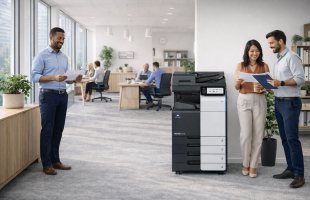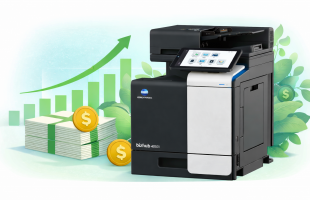
Schools print far more than most people realize. From classroom handouts and testing materials to IEP documentation, report cards, and administrative records, printing is still a daily operational necessity. When printing is unmanaged, however, it quickly turns into a problem.
Uncontrolled printing leads to wasted paper and toner, crowded print queues, security risks from unattended documents, and constant IT support requests. PaperCut MF helps schools regain control by delivering secure, cost-conscious, and easy-to-manage print workflows across the entire campus.
Designed specifically for high-volume, multi-user environments, PaperCut MF gives schools full visibility into print activity while making printing simpler for students, staff, and IT teams alike.
What Is PaperCut MF?
PaperCut MF is print management software that sits between users and printers, copiers, and multifunction devices. It tracks, controls, and secures printing, copying, and scanning across your school or district.
Unlike basic print tracking tools, PaperCut MF combines print visibility and reporting, security and user authentication, waste-reduction policies, mobility features, and scanning and OCR (optical character recognition) workflows.
Why Print Management Matters in Education

Printing in schools is not just about cost. It is also about privacy, efficiency, and accountability.
Common challenges schools experience without print management include:
- Students printing excessive or duplicate jobs
- Staff accidentally printing confidential documents to shared devices
- Unnecessary color printing increasing supply costs
- Crowded devices before class transitions
- Limited visibility into usage by building or department
Stronger Security for Student and Staff Documents
Schools handle sensitive information every day, including student records, special education paperwork, health forms, and employee documentation. Leaving these documents unattended at printers creates unnecessary risk.
Key Security Features
- User authentication at the device
- Secure Print Release
- Watermarking and audit trails
- Print archiving options
Flexible Print Anywhere Access Across Campus
PaperCut MF supports Find-Me Printing, allowing users to print to a shared queue and release jobs at any compatible printer after authentication.
Less IT Work Through Automated Print Deployment
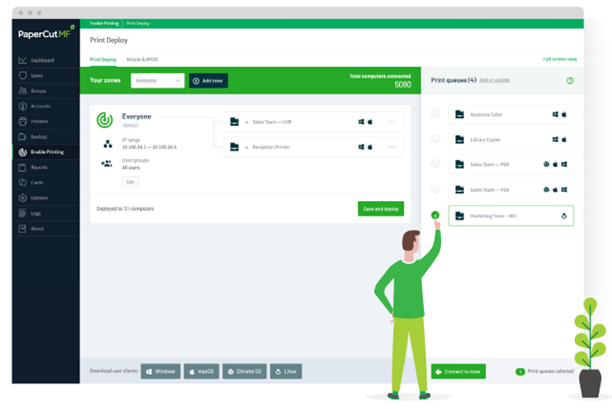
Printer support tickets can overwhelm school IT teams. PaperCut MF includes Print Deploy, which automates printer and driver deployment based on user location or group.
Actionable Reporting That Drives Cost Control
PaperCut MF includes powerful built-in reporting tools that give schools real insight into how printing resources are being used. Instead of guessing where costs come from, administrators and IT teams can rely on clear data to make informed decisions about policies, device placement, and budgeting.
Reporting Examples for Schools
With PaperCut MF, schools can easily review and schedule reports that show:
- Print volume by user, department, or building
- Color versus black-and-white usage
- Device utilization trends
- Printing costs over time
Smart Print Policies That Reduce Waste
Reducing print waste in schools does not have to mean limiting access or creating frustration. PaperCut MF allows schools to apply practical print policies that guide responsible printing while keeping everyday workflows fast and simple.
School-Friendly Print Rules
- Default duplex printing for staff
- Encourage grayscale printing
- Limit student color printing
- Restrict after-hours printing
Quotas That Support Fair Student Printing
PaperCut MF supports quota systems that reset on a schedule, helping schools maintain fairness while controlling print volume and costs.
Scanning and OCR for Modern School Workflows
Integrated scanning and OCR features allow documents to be converted into searchable, editable files and routed to email, folders, or cloud platforms.
What’s New with PaperCut MF 25.0?
- Security and performance enhancements
- Updated OS, driver, and device compatibility
- Incremental feature refinements
FAQ: PaperCut MF in Schools
Does PaperCut MF work with mixed printer fleets?
Yes. PaperCut MF supports a wide range of printer manufacturers.
Can students print from Chromebooks and mobile devices?
Yes. PaperCut MF supports Chromebooks, laptops, tablets, and smartphones.
How does secure release printing help schools?
It prevents sensitive documents from being left unattended and reduces wasted print jobs.
Combine PaperCut MF with Our Printers and Copiers!
PaperCut MF works best when it is paired with reliable, school-ready copiers and printers. Document Solutions offers a wide range of copier and printer options designed for education environments, from classroom-friendly devices to high-volume systems for administrative offices. When combined with PaperCut MF, these devices help schools create a secure, efficient, and cost-controlled print environment that is easy for staff, students, and IT teams to manage.
At Document Solutions, we help schools implement print management systems that are secure, cost-effective, and easy to use. Call us at (888) 880-3377 to learn how PaperCut MF can improve printing across your school or district and be sure to check out our wide variety of powerful printers and copiers! For information about PaperCut MF, visit https://www.dsbls.com/papercut/. Fill out the form below to contact us today: